Airport Departure Board for Home
A real flight board for home. Turn Mach 2 into a live airport departure board for any airport and airline — the big-terminal FIDS effect, shrunk to a handmade maple display for your desk or shelf, with no subscription.
A tiny FIDS for your desk.
Choose an airport, choose an airline, pick a refresh interval, and start the scene. Mach 2 becomes a mini LED flight board on your desk — an airport-style departure board that lays out live departures on the LED matrix like a miniature terminal display board.
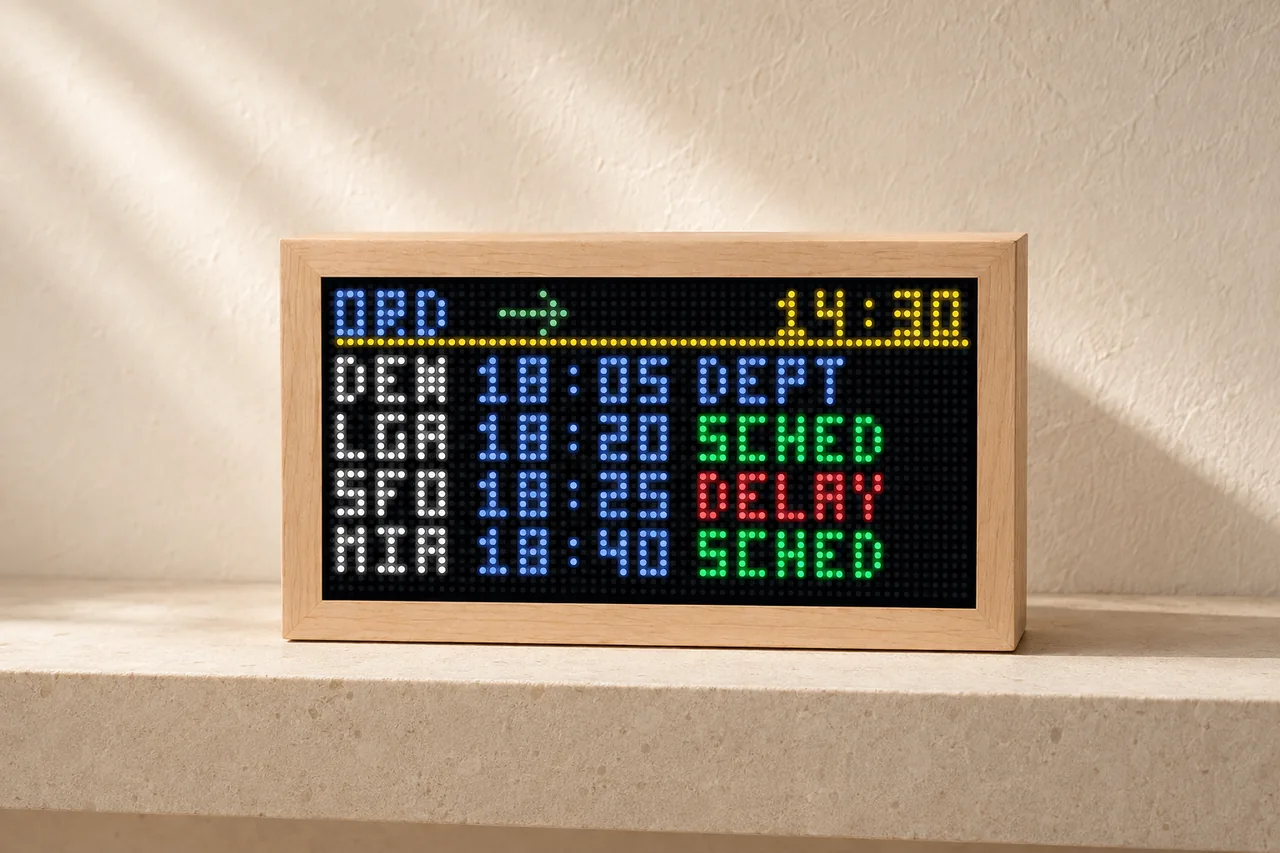
64 × 32 pixels · 3 mm pitch · 192 × 96 mm LED panel
7.56 × 3.78 in before the maple enclosure.
Airport plus airline.
The portal asks for a 3-letter airport IATA code, like ORD, and a 3-letter airline ICAO code, like UAL. The board shows matching departures by time.
Save, then start.
Enter the airport, airline, and refresh interval, press Save Settings, then start Departure Board. The first live result can take a moment to appear.
Balance live data and usage.
Start around 15-minutes for a normal desk display. Shorter intervals feel fresher; longer intervals reduce FlightAware API usage.
An LED flight board for home.
It is the same idea as the big split-flap and LED display boards you see in airport terminals, shrunk down to a maple desk piece — your own flight board for the airport you care about.
One display, three live modes — Departure Board included.
Departure Board mode ships on every Mach 2, alongside the Overhead Scanner and flight-number tracking. Handmade solid maple, browser setup, free OTA updates, and no device subscription.
Split-flap boards, wall panels, or the Mach 2
"Flight board" covers three very different products. All three look great on a wall or shelf — the difference is what they show and what they cost to keep running.
Mechanical split-flap displays create the airport flip-clack effect for messages and connected content. Mach 2 uses LEDs for a compact aviation display. Departure Board needs your FlightAware key; provider charges may apply. See the Vestaboard comparison →
Acrylic LED panels like TheFlightWall track area flights through a phone app. Some models hang on a wall; the Mini also has a rear stand for a desk or shelf. Check the maker for current sizes and pricing. See the Flight Wall comparison →
A handmade maple desk piece with a real live Departure Board mode, overhead plane scanning, and flight-number tracking. $399 once, data and OTA updates included, no subscription.
Starting Departure Board
- Add your FlightAware key. The Departure Board runs on your own FlightAware AeroAPI key, linked in the owner portal and stored securely for your device.
- Enter airport and airline. Use IATA for the airport, like ORD, and ICAO for the airline, like UAL.
- Choose refresh interval. Two minutes is available, but 10 minutes is a better everyday starting point.
- Save settings and start. After switching scenes, give the box a little time to fetch and render the first live board.
If the board is blank at first
Wait after switching scenes. Departure Board may take a second before the box updates and the first live results appear.
Save settings first. Airport, airline, and refresh interval still need Save Settings before the scene has the latest values.
Check code types. Use airport IATA codes like ORD/LAX/JFK and airline ICAO codes like UAL/AAL/DAL.
Check the FlightAware key. If you do not want to create one or hit a snag, email or text me and I will help make it work.
Flight display board FAQ
They are a Flight Information Display System, or FIDS — the airport departure and arrival boards that list flights, times, gates, and status. Mach 2's Departure Board mode is a miniature FIDS for your desk.
Yes. The Mach 2 Departure Board turns a handmade maple LED display into a home flight display board: pick an airport and airline and it shows live departures, FIDS-style, on the LED matrix.
Yes — enter any airport's 3-letter IATA code (like ORD, LAX, or JFK) and an optional airline ICAO code to filter the board to the departures you care about.
Prices vary by manufacturer, size, and display technology. Check each maker for current pricing. The Mach 2 is $399 with free US shipping and no subscription — live departures, overhead planes, and flight-number tracking in one handmade maple display.
It has the airport-board feel, using LEDs rather than mechanical flaps. Mach 2 is a $399 flight display with overhead tracking included. Departure Board uses your own FlightAware AeroAPI key, and provider charges may apply. Vestaboard is a separate mechanical messaging product with its own pricing and optional content subscription.